Blog
Reading a Google Cloud Organization Like a Database: Asset Inventory to BigQuery
Reading time.
1 min
Wrtitten by
Carlos Calvo
Data Engineering
Security
Google Cloud
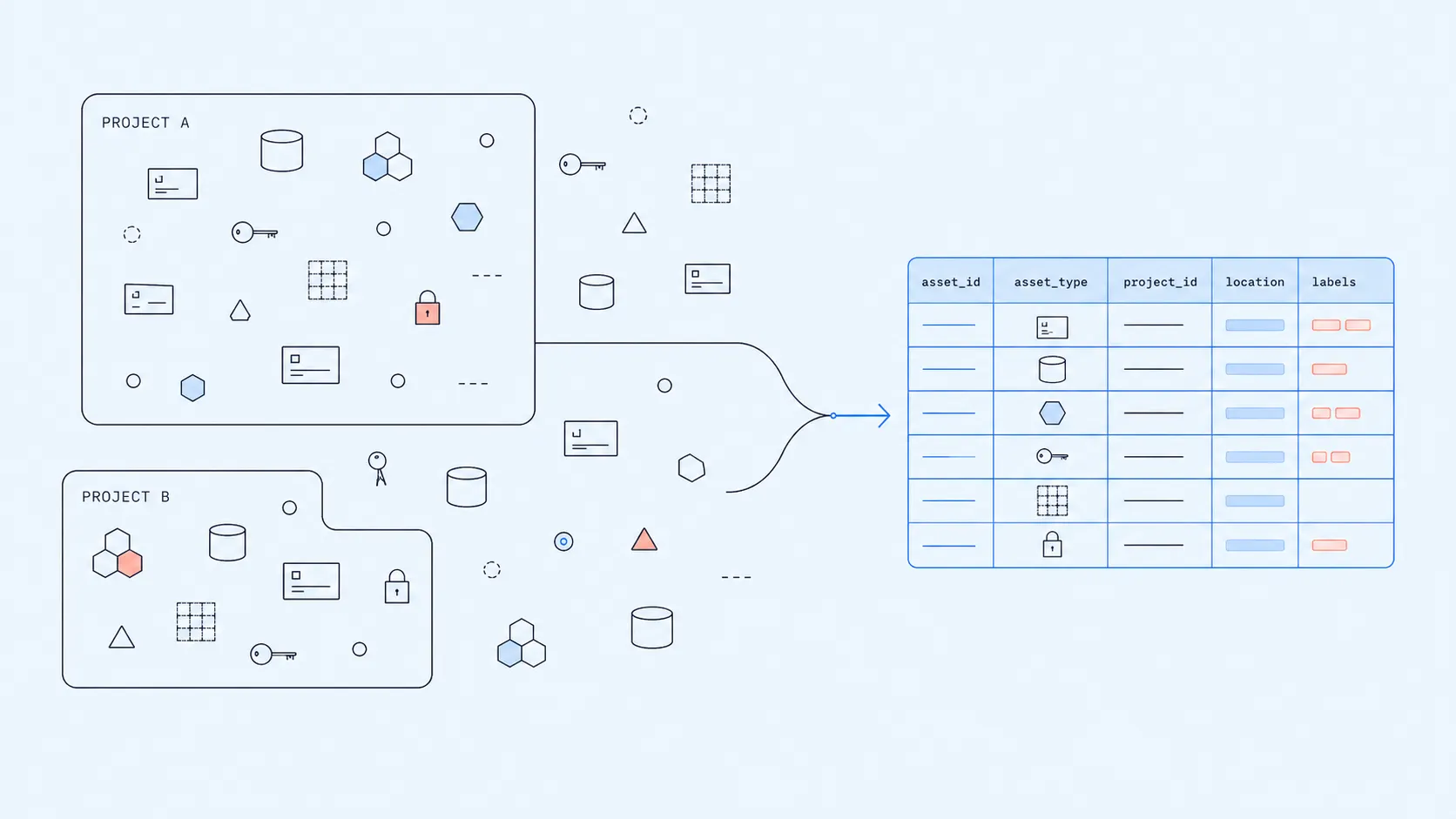
Every assessment of a Google Cloud organization runs into the same wall: the web console is a single-resource inspector, but the questions that justify the assessment are joins. Which projects lack required cost labels? Which external identities hold privileged roles across the estate? How many GKE clusters are past their support window? The answers live in metadata that Cloud Asset Inventory exposes through an API, and the natural destination is BigQuery, where SQL describes the system.
A brief introduction to each.
Cloud Asset Inventory is, in Google’s own words, a “global metadata inventory service that lets you view, search, export, monitor, and analyze your Google Cloud asset metadata”. It catalogs every resource and IAM binding under any Google Cloud organization, folder, or project. The service is accessible through the console web UI for ad-hoc browsing, and through a comprehensive REST API with operations for searching, listing, exporting, batch reading, IAM policy analysis, and real-time change feeds.
BigQuery is Google Cloud’s serverless data warehouse, and one of the most common reasons organizations adopt Google Cloud over other clouds. Data is organized as Project → Dataset → Tables (or Views), and SQL queries run across any combination of tables that the calling identity can read.
This article shows how to use the Asset Inventory export operation to land the data in BigQuery, and the most useful things to do with it once the data lives there. The call can be triggered manually with gcloud for ad-hoc work, or scheduled with Cloud Scheduler when the dataset has to stay up to date.
The pipeline
The Asset Inventory API (reference) does much more than export. It supports searching across asset metadata, listing resources by scope, batched reads, IAM analysis at organization level, and real-time change streams via Pub/Sub. For an end-to-end queryable view of the organization, the relevant operation is exportAssets:
The body declares what to export and where. Two filters control the scope of the export:
contentTypeselects the facet of the inventory:RESOURCEfor asset metadata,IAM_POLICYfor permissions,ORG_POLICYfor legacy organization policies,ACCESS_POLICYfor Access Context Manager,OS_INVENTORYfor VM Manager data, orRELATIONSHIPfor resource graphs (Security Command Center Premium).assetTypesis an optional list (with regex support, e.g.compute.googleapis.com.*) to scope by service or resource type. Empty means everything within the chosen content type. For a full assessment, leave it empty for the first pass and refine later.
The endpoint is asynchronous. It writes to either BigQuery or Cloud Storage in a single export operation and returns a long-running operation handle.
Two ways to call it:
Manual
gcloud asset export, when you need a baseline immediately during an assessment.Cloud Scheduler, to issue the same call on a recurring schedule. Scheduler invokes the API directly, with no Cloud Function in between; the auth detail that makes this work is covered later.
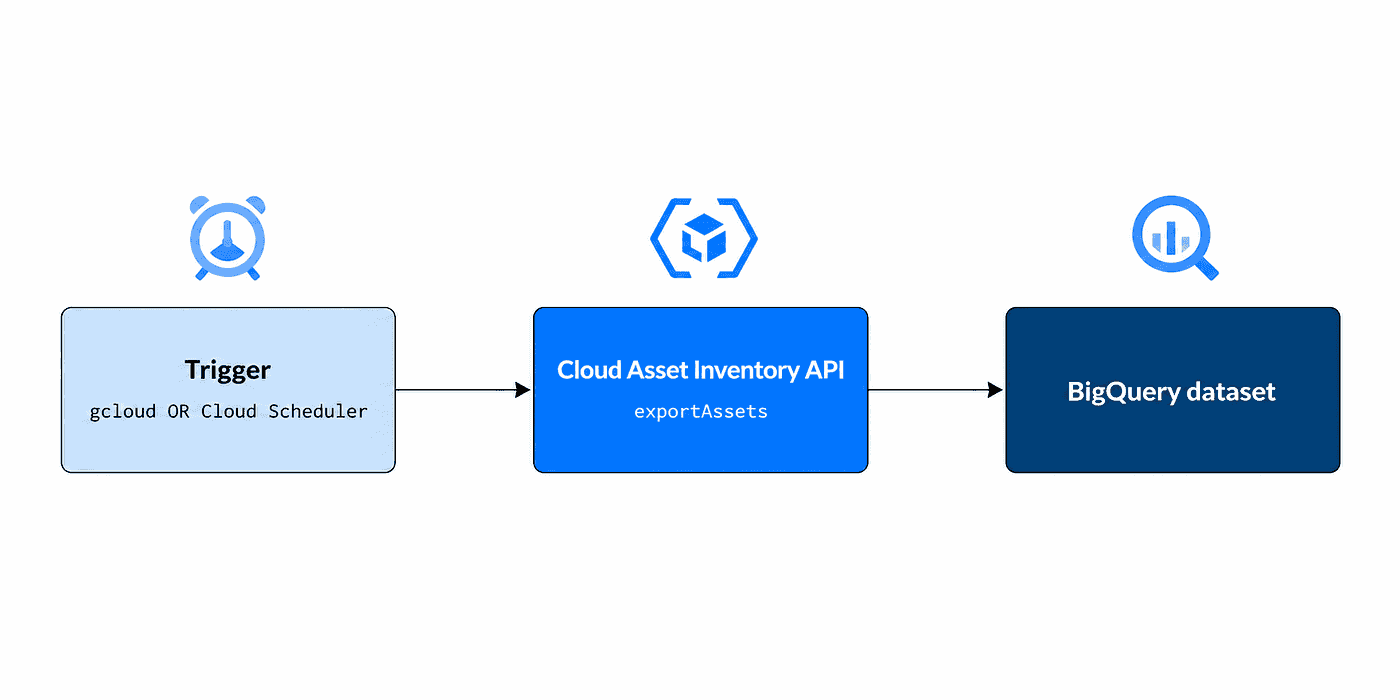
The three-component pipeline: a trigger calls the Asset Inventory API, which writes directly to BigQuery.
The operational surface stays small: one BigQuery dataset, one service account with four narrowly scoped roles, and either a single command or a single Scheduler job. No Pub/Sub topic, no Cloud Function, no custom code beyond the SQL written afterwards.
BigQuery: the destination
BigQuery’s hierarchy is straightforward. A billing project hosts the resources and accumulates query and storage costs. Inside it lives one or more datasets, each acting as a namespace for tables and views. Tables are columnar, stored separately from compute, and queried with standard SQL.
For this pipeline the setup is minimal:
The Asset Inventory export creates the destination tables on first run. With --per-asset-type set, it writes one table per asset type, named by the asset type with non-alphanumeric characters substituted by underscores. For example, the export of compute.googleapis.com/Instance lands as <TABLE>_compute_googleapis_com_Instance. Each table receives typed RECORD columns mapped from the asset's native schema, up to fifteen levels of nesting.
We do not pre-create the tables and do not pre-define their schemas. The export handles both.
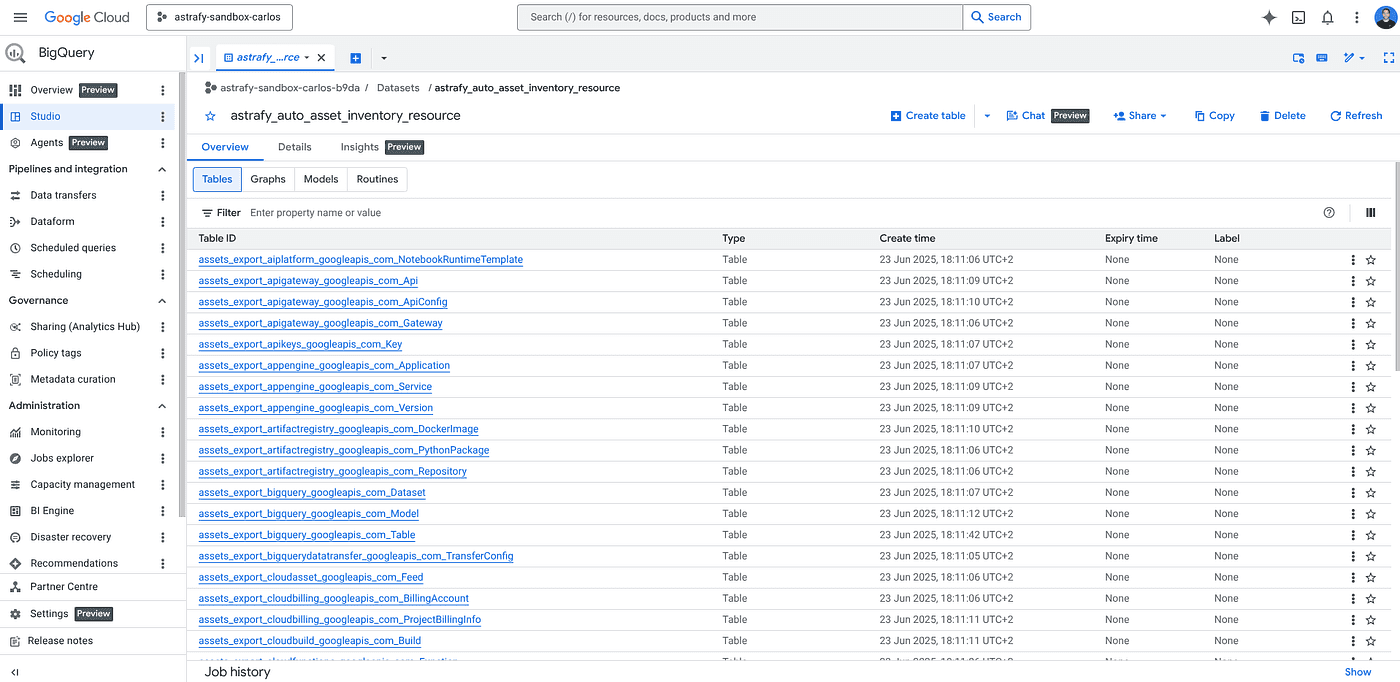
The BigQuery dataset after a `per-asset-type` export, with one table per resource type.
Walkthrough: manual one-shot with gcloud
The gcloud asset export command triggers the export operation on demand. The data still lands in BigQuery, not on the local filesystem; "manual" refers to running the call ad hoc rather than on a schedule. It is the right tool when you have just been granted access to a new Google Cloud organization and want a baseline today:
--per-asset-type produces one cleanly typed table per asset type, which keeps the SQL idiomatic. --output-bigquery-force overwrites the destination tables, so re-running the command produces a clean snapshot rather than appending duplicates. Running the command a second time with --content-type=iam-policy adds the permissions facet to the same dataset.
The export covers everything visible to the calling identity. Granting roles/cloudasset.viewer at the organization level surfaces the full estate; granting it at folder or project level limits the scope and produces a partial picture. Be explicit about scope when running an assessment. A partial inventory still feels complete in BigQuery and can lead to confident-but-wrong conclusions.
Walkthrough: recurring with Cloud Scheduler
Cloud Scheduler is the Google Cloud native cron service. It issues the same exportAssets call on a recurring schedule, so the BigQuery dataset stays in sync with the live state of the organization without anyone re-running gcloud manually. The job posts the same JSON body that the gcloud command serializes internally:
One detail worth flagging. Google APIs hosted on *.googleapis.com accept OAuth tokens issued by the calling service account. The Scheduler flag is --oauth-service-account-email. OIDC tokens, used for Cloud Run targets and external HTTPS endpoints, are not accepted by cloudasset.googleapis.com.
That single authentication distinction is what keeps the pipeline at three components instead of adding a Cloud Function as an auth proxy.
The service account needs four predefined roles:
roles/cloudasset.vieweron the export scope: read assets.roles/serviceusage.serviceUsageConsumeron the billing project: use the Asset Inventory API.roles/bigquery.dataEditoron the destination dataset: write tables.roles/bigquery.jobUseron the destination project: run the load job.
Two prerequisites the first time: enable the Cloud Asset API on the billing project (gcloud services enable cloudasset.googleapis.com), and verify the Cloud Scheduler service agent has roles/cloudscheduler.serviceAgent. Cloud Scheduler emits success and failure logs to Cloud Logging; an alert on consecutive failures catches authentication regressions or quota issues before they silently age the dataset.
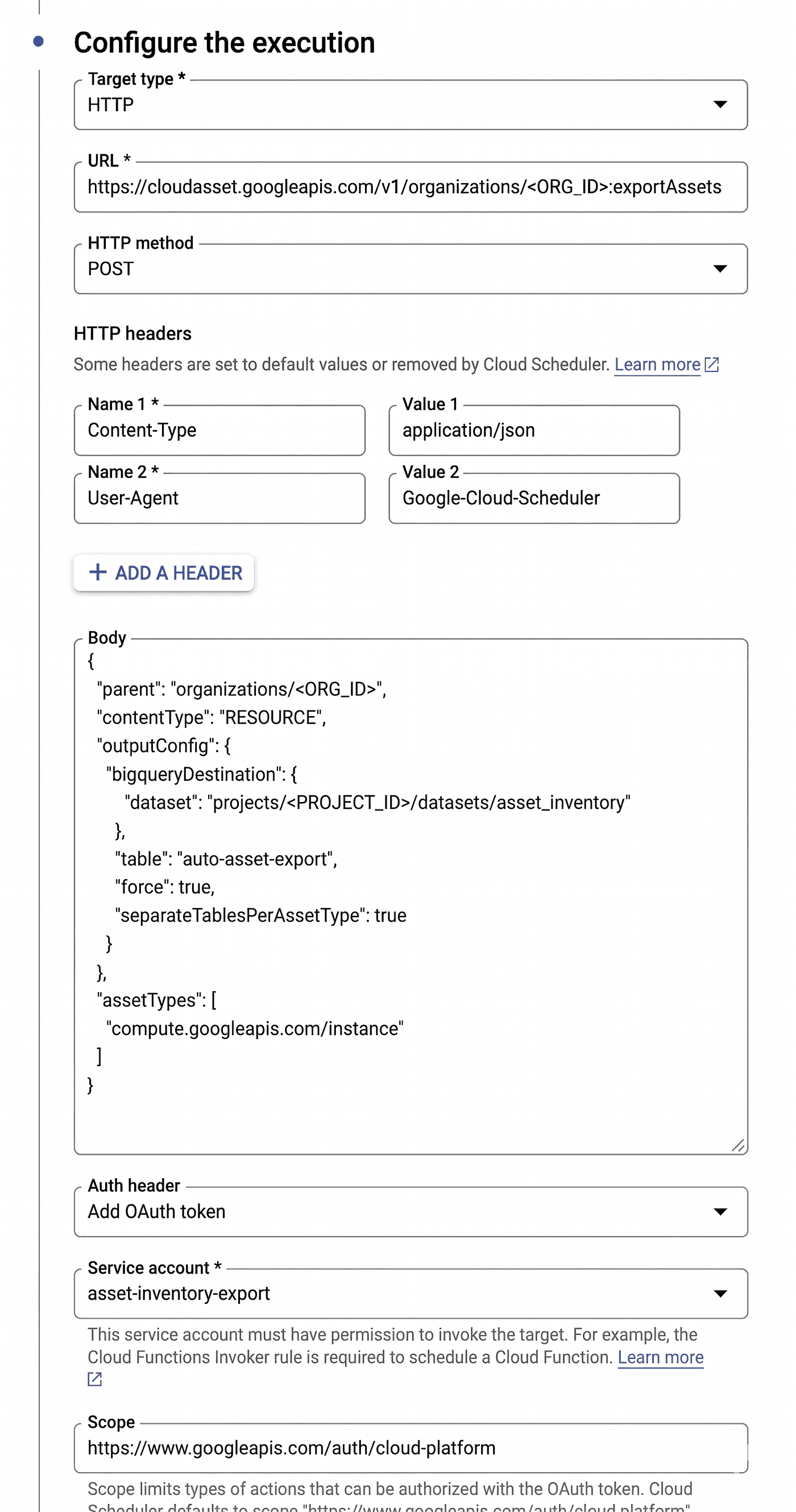
Cloud Scheduler job configured to call `cloudasset.googleapis.com` directly with an OAuth token.
Snapshots and history
With force: true and no partition spec, the export overwrites the destination tables on each run. The dataset always reflects the latest state, with no history.
When drift analysis or month-over-month governance reports matter, the API supports keeping history natively, with no custom orchestration:
Partitioned destination tables via
partitionSpec. SetpartitionKey: READ_TIME(orREQUEST_TIME) in the BigQuery output config and the export adds two timestamp columns to the schema (readTime, requestTime) and writes each run to its own date-partitioned slot of the same table. Withforce: trueonly the partition for the current run is overwritten, leaving past partitions intact.
Partition expiration at the dataset level. Setting
default_partition_expiration_dayson the dataset applies to every partitioned table created inside it, including the per-asset-type tables produced by the export. BigQuery prunes partitions older than the threshold automatically.
(Wildcard ALTER on <TABLE>_* is not supported. The dataset-level default is the right knob; alternatively, run a one-line ALTER TABLE per generated table.)
The combination gives a rolling history with bounded storage cost, and zero code beyond the partition setting.
Querying examples
The dataset answers anything SQL can express. A few representative examples to give a sense of what becomes available; the actual question set in an assessment is open-ended.
Service distribution across the organization.
GKE cluster inventory with version and location, attributed to the parent project.
VPC topology: networks, subnets, and firewall rules per project.
Compute instances grouped by machine type, to flag oversized or legacy shapes.
Firewall rules that allow ingress from anywhere on the internet. A near-universal first check on any unfamiliar Google Cloud organization.
If the asset schemas are unfamiliar, the BigQuery web UI ships a built-in Gemini assistant that reads the table schema and produces SQL from a natural-language prompt. Useful for the first pass against asset types you have not queried before.
Consuming the dataset
The BigQuery dataset is the foundation. Everything beyond it is a consumer:
Saved queries, kept in the BigQuery UI under named groups, run on demand. The right place for ad-hoc audit questions you want to keep around without scheduling a job.
Scheduled queries, recurring SQL managed by BigQuery itself, materialize cleaned tables on a cron. No external orchestrator. Typical use: turn the raw
iam_policyexport into a flattened, denormalized view nightly.Connected Sheets, where a Google Sheet pulls live from a BigQuery view or table. The right layer for stakeholders who consume cloud state through spreadsheets.
Looker Studio and Looker dashboards for visual reporting. Same source data, richer presentation, suitable for engineering reviews and executive readouts.
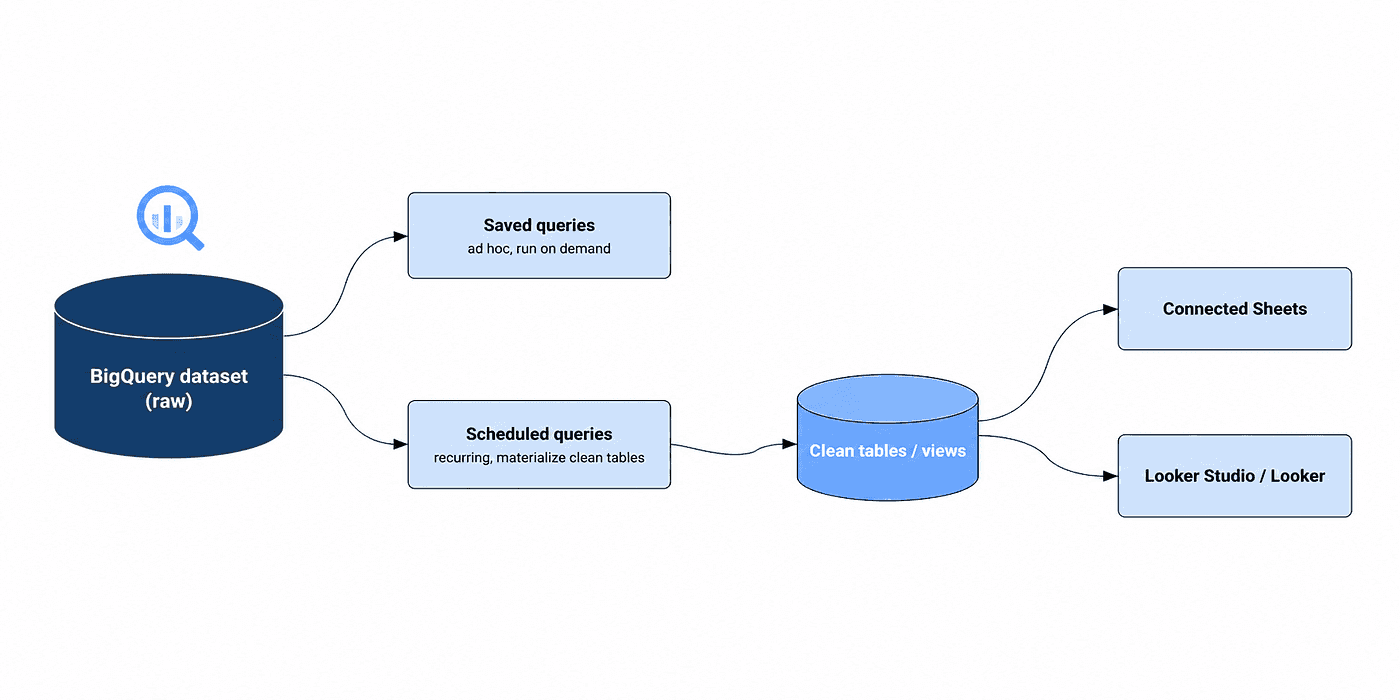
Scheduled queries materialize clean tables consumed by Connected Sheets and Looker.
Alternative output: JSON to local terminal or Cloud Storage
The exportAssets operation only writes to BigQuery or Cloud Storage. For a full-organization JSON snapshot, replace bigqueryDestination with gcsDestination and the output lands as JSON files in a GCS bucket; download them with gsutil cp or gcloud storage cp for local processing.
For smaller exports or one-off inspection, gcloud asset list is a different, synchronous endpoint that prints JSON straight to stdout:
This bypasses the export pipeline and reads through the API directly. Useful for quick scripting or feeding a small slice to a large language model with controlled prompts (sanitized identifiers, fixed taxonomy, structured output). Not appropriate for full-organization snapshots at scale because of response size and pagination limits.
When the analysis target is BigQuery, stay in BigQuery. JSON to stdout is the convenient path for ad-hoc local work; JSON to GCS is the path for full exports outside BigQuery.
End-to-end case: IAM audit with Connected Sheets
A worked example of the consumer path. Same pipeline, content type changes from RESOURCE to IAM_POLICY in the export body.
The raw iam_policy table is correctly structured but hard to read directly. The schema nests iam_policy.bindings as a repeated record, with role and a repeated members array per binding. Reading "who has what" requires unnesting both. A scheduled query materializes a flattened view once a day:
That view, exposed through Connected Sheets, gives a non-technical reviewer a sortable, filterable, automatically refreshing IAM snapshot of the whole organization. No engineer involvement to read it. Sheets refresh on demand or on schedule, pulling the latest state after each Scheduler run.
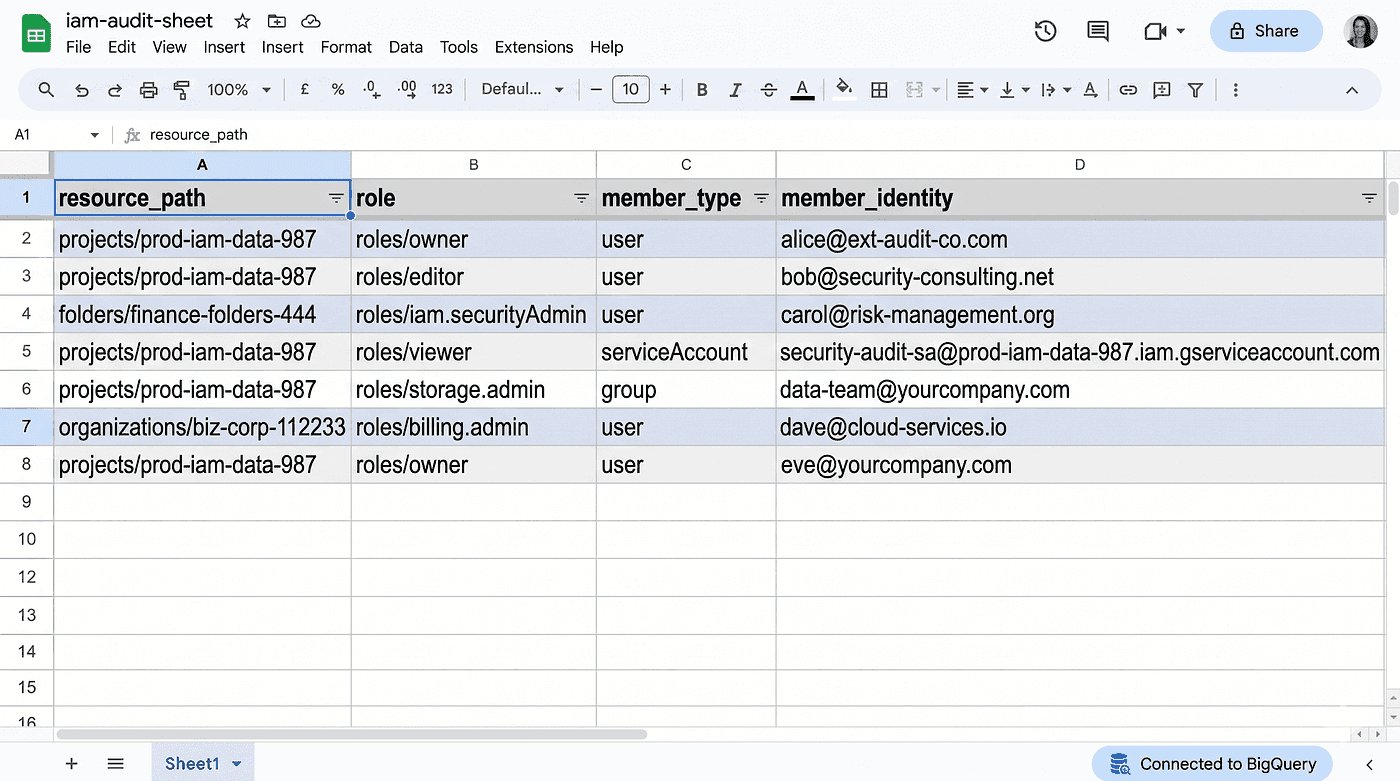
A Connected Sheet over the `iam_flat` view, refreshed live from BigQuery.
A useful detection query for governance reviews, looking for external identities holding privileged roles, is then a simple WHERE clause:
The same shape works for service accounts that have not been used recently, wildcard allAuthenticatedUsers bindings, and any other governance check that maps to a SQL filter.
Where this matters most
The pattern delivers value in a few directions, listed roughly in order of how often we use it:
Pre-deployment assessment of a client’s Google Cloud organization. Before deploying a data platform on a new client, land their inventory in BigQuery and answer the architecture, security, and FinOps questions in SQL. Hours instead of days.
Continuous self-audit of your own organization. Scheduler refreshes the dataset, dashboards in Looker Studio surface drift, alerts fire on high-risk changes (new external IAM bindings, EOL GKE versions, public buckets).
Compliance evidence collection. The
ORG_POLICYcontent type produces queryable evidence of policy enforcement, replacing screenshot-based audit packs.Targeted reviews. Per-asset-type exports limit scope when only networking, only storage, or only IAM is in play.
All four sit on the same three components.
Closing
A queryable inventory is the missing primitive for governance work in Google Cloud. The web console verifies single resources; SQL describes the system. Once the data is in BigQuery, the rest is the question you actually want to answer.
The compounding effect is concrete: a full-organization assessment moves from days to hours, IAM drift becomes a SQL filter rather than a console walk, audit evidence is refreshable rather than reconstructed from screenshots, and the analytical surface keeps growing every time someone adds a saved query, a scheduled view, or a connected sheet.
At Astrafy we use this pattern as part of the assessment work we do before deploying our DataPlatform on a new client’s Google Cloud organization. If you are sizing up a new Google Cloud estate, or auditing one you already own, the queryable-inventory approach replaces a lot of clicking with a SQL block.
Written by

Carlos Calvo
Platform Engineer

 Download