Blog
Domain-Driven BigQuery Column Security: Moving to Data Governance Tags
Reading time.
Wrtitten by
Axel Thevenot
Security

Open a BigQuery table schema and click Add policy tag. The sentence at the top of the dialog deserves more attention than the rest of the screen.
“Future standard.” “Eventually replace.”
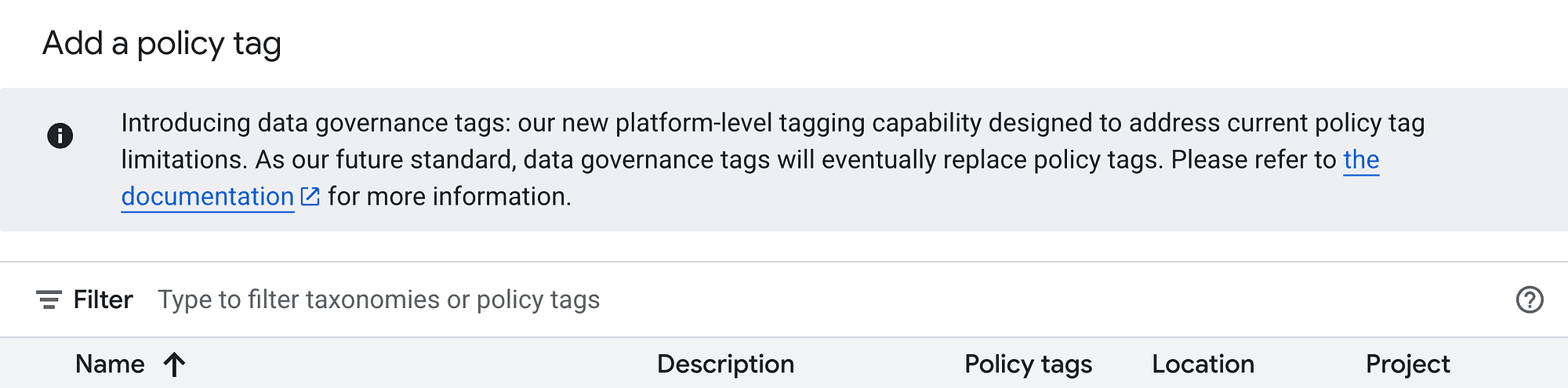
This is more than an invitation to try a new feature. It signals which object Google wants us to build on next, and which one we should think twice about extending.
Do we want to build another three years of column security on a model Google has already said it intends to replace? For a new domain, my answer is no.
But let us separate direction from timing. Policy tags are not deprecated, and data governance tags are still in Preview. A banner is neither a migration deadline nor a reason to remove a working security control overnight.
My approach is straightforward: start new domains on data governance tags and migrate existing domains one at a time, each with a clear owner. Keep the rest of the taxonomy in place until its columns have moved.
The most interesting change, though, is architectural. Data governance tags are particularly relevant to a data mesh, where domains own their data products and a shared platform provides the controls.
I will start with the four objects behind data governance tags, then use them to show where policy tags reach their limits. From there, we will look at how BigQuery evaluates access, build the architecture step by step, and finish with a bonus dbt integration that lets domains attach the tags themselves.
Disclaimer: This is an independent architecture note. It is not official Google guidance or a BigQuery product roadmap.
Summary
I. Four Objects, Four Responsibilities
The tag key
The tag value
The data policy
The mask
II. Why Policy Tags Reach Their Limits
A regional taxonomy in a multi-region platform
Copying and replication are different operations
The sensitivity monolith
One access decision, two permission systems
III. How BigQuery Decides What You Can See
Table access, then the policy project
How the tree is evaluated
IV. Building the Architecture
The hierarchy and architecture decisions I start with
The six deployment steps
Optional: a custom mask
Bonus: Attaching the Value from dbt
I. Four Objects, Four Responsibilities
To understand data governance tags, distinguish what a column means from who may read it and what they may see.
These responsibilities are divided among four objects. The tag key groups related concepts. A tag value identifies a concept within that group and is attached to a column to describe its meaning.
A data policy references the tag key and value, and grants specific readers access to either the raw data or a masked version.
The mask defines what the masked version reveals.
In short: The key and value classify the column, the data policy and mask determine who may see its data and in what form.
For a concrete example, let us use one key per data domain: customers, with a contact value and its child attribute value, contact_email.

The tag key
The customers key is global: we define it once and reuse it across projects and regions.
For column security, the Resource Manager key must be created with purpose = DATA_GOVERNANCE. This distinguishes it from ordinary resource tags used in IAM conditions on datasets, tables, or views. Those tags can inherit through the Cloud resource hierarchy, but they are not a substitute for column-level controls.
In this example, the key belongs to a single governance project, giving it the namespaced name:
An organization parent is also supported (even if I don’t recommend it), in which case the name is ORGANIZATION_ID/customers. Choose the parent deliberately and keep it stable, because every tagged column references that namespace.
The tag value
Values organize the concepts within that data governance tag key. Under customers key, contact can be a first-level value and contact_email a second-level child value of contact.
The hierarchy supports up to five value levels. This lets us move from broad categories to specific attributes without creating a separate key for every concept.
In this architecture, we attach the attribute, not the category, to each physical column that represents it:
The attachment contains two strings:
The namespaced key:
governance-project/customers.The value’s short name:
contact_email.
The value is not written as the full path governance-project/customers/contact/contact_email. Because the attachment only carries the short name, it requires those names to be unique across the whole key.
The data policy
A data policy references the key and value and lists the principals granted access, the grantees.
The v2 Data Policy API provides two relevant policy types:
RAW_DATA_ACCESS_POLICY: grantees can see the real value.DATA_MASKING_POLICY: grantees can see the configured mask.
The keys and values are global, but each data policy applies only in its own location.
Important Note: The tag labels the column. The policy protects it.
With no policy for that tag in the table’s location, consider this is cosmestics only. Anyone who can read the table can read the column.
Once any policy exists for that tag in the table’s location, a person can read the column only with a grant on its value or on a parent tag value on the way up. Everyone else is denied.
So, create the policy in every location you want to apply a data policy on tables for your tags. An EU policy leaves US and europe-west1 data open.
The mask
The mask defines what grantees of a DATA_MASKING_POLICY see. BigQuery returns that result instead of the stored value.
For almost every column a predefined expression is already more than enough: SHA256, ALWAYS_NULL, DEFAULT_MASKING_VALUE, LAST_FOUR_CHARACTERS, FIRST_FOUR_CHARACTERS, EMAIL_MASK, or DATE_YEAR_MASK.
When none of the predefined expressions fit, we can build and use a custom mask using a SQL routine in the same location as the policy. I give an example of it later in this article as an optional building step.
The policy decides who receives the mask, and the mask decides what they still see. This means an email and a date of birth can be revealed (masked) differently.
II. Why Policy Tags Reach Their Limits
Policy tags work. The question is whether their regional taxonomy and their reader-role model fit the platform we want to operate.
A regional taxonomy in a multi-region platform
A policy tag and its table must share a location, so a warehouse in EU and US needs two taxonomies (let's say this is the equivalent of the tag key). Google lets us copy a taxonomy to another location and keep the same policy tag IDs, but the permissions granted on those tags are not synced. Every later change also needs another explicit sync.
With data governance tags, the classification is defined once: the same customers key and contact_email value describe the column in every project and every region. Enforcement stays regional.
Define the classification once. Deploy its enforcement in every location.
Copying and replication are different operations
Moving data to another region can mean two different things, and BigQuery treats them very differently.
A copy creates a new, independent table in another region. That operation is blocked as soon as a column carries a tag: I got Cross-region copying of tables with data governance tags on column is not supported, and policy tags have the same restriction.
Replication is the other move. BigQuery keeps a read-only secondary replica of a whole dataset in sync with its primary, for failover or for reading close to the consumers. This is where the two models diverge, and the difference favors data governance tags.
With policy tags, the secondary replica does not receive the taxonomy or the grants on it. A query there fails on every tagged column, unless the reader holds Fine-Grained Reader on the project, folder, or organization. That is not a copy of the column grant. And promoting the replica to primary does not repair the bindings. Someone still has to point them at a taxonomy in the new primary region.

With data governance tags, the replication guide says BigQuery creates the data policies in the secondary region, including the policies on these tags and their grantees. A query on the secondary uses that copy.
I am following the replication guide on this point, and I have not tested replication myself. It is still a real advantage for disaster recovery, and it is not a free one.
The sensitivity monolith
Almost every BigQuery organization I work with has High, Medium, Low. Google’s best-practice example is exactly that tree.
It is elegant, but it answers the wrong question. Sensitivity tells us how dangerous a value is. Column security has to answer who owns it, who may read it, and in what form, and those answers follow domains and scopes, not risk tiers.
A salary and an account balance are both “High”, yet payroll reads one and the controllers read the other. So the tree grows High_salary, High_ledger, and a list of exceptions until it becomes a domain model hidden inside sensitivity tiers, with nobody owning the nodes.
High, Medium, and Low is a classification workshop.
It is not an access contract.
To be fair, policy tags can follow domains too, and the monolith is a limit of how we designed the tree rather than of the product. The migration is simply a good moment to start from ownership: customers, finance, hr, supply_chain, and so on.
One access decision, two permission systems
Ask a simple audit question: who can see this email column, and who can see the masked email?
Of course a person does not need both roles, but the two raw and masked access roles are granted on two different objects.
The policy tag is the lock on the column. Someone who should see the stored email gets roles/datacatalog.categoryFineGrainedReader on that tag. The binding is IAM on a Data Catalog resource. Someone who should see a mask gets roles/bigquerydatapolicy.maskedReader on a data policy that points at the same tag. That second binding is IAM on a BigQuery resource.
One question then has two answers, in two APIs, two Terraform resources, and maybe even two teams.
With data governance tags, both answers are grantees on a data policy. The raw policy lists who sees the stored value. The masking policy lists who sees the mask… That’s it.
III. How BigQuery Decides What You Can See
Keys, values, bindings, and grants have separate lifecycles, which is useful for onboarding but means a column can be labeled long before it is protected. So I ask three questions: can the principal read the table, which policies apply, and what do they grant?
Table access, then the policy project
Column security is a second check on top of table access. The principal still needs bigquery.tables.getData, usually through roles/bigquery.dataViewer, and a column grant does not replace it.
By default, BigQuery only evaluates the policies of the table’s project. To use a central governance project, an organization administrator sets the default policy project:
The option is location-specific: region-eu covers neither region-us nor europe-west1, so we need to set it in every location where we use BigQuery.
Once it is set, BigQuery evaluates the policies of both the table’s project and the governance project, and the table project wins when they conflict.
→ This is why I keep policies in the governance project only: a local policy in a warehouse project would quietly override the approved one.
How the tree is evaluated
This is the part people get wrong, so here is one simple tree and one person.
A data policy covers the value it is attached to, and every value under it, for a person whose walk reaches that value.
A policy on
contactcoverscontact_name,contact_email, andcontact_phone. It does not cover siblingcard_number.A policy on
contact_emailcovers that value only (no child). It does not cover parentcontactnor siblingcontact_name.

Important (read it twice). BigQuery does not add up the grants. It starts at the value on the column and walks toward the root. It stops at the first value where this person holds a grant. On that value, a raw grant beats a mask. A policy that names other people does not stop the walk toward the root.
This means, for a given principal, a mask grant on the child hides raw data even if the raw grant is given at the partent value.
IV. Building the Architecture
The hierarchy and architecture decisions I start with
When a team asks me where to begin, I give them one shape, and I tell them it is a start for discussion, not a standard.
The tag key is the domain:
customers.The first value defines main entity and is where the raw readers are named:
contactgranted to for the customer care team.The second value is the attribute we attach to the column, with its mask:
contact_email, withEMAIL_MASK.
On every masking policy, the grantee I add without being asked is the whole company. A person who can already read the table should get a row back, with the sensitive columns masked.
If you leave the company off that grant, the column is denied and the query fails (welcome frustration). Service accounts sit outside the company set, so a pipeline does not inherit that mask.
Here is the shape on two domains. customers is the one I will build in this article. finance is the same shape, with different readers.

contact_email is a business meaning, not a column name. A customer email and an employee email do not share a contract, while two columns with different names can share one value when their meaning, type, and reveal are the same.
I do not ask every organization to copy exactly this logic.
The mistake is a tree nobody can explain.
A subdomain with its own owner may deserve its own key, and a grant finer than the object may need a third or fourth level. Five levels is the ceiling, but add one only when the access decision needs it, not to look more governed.
If you already have a classification you can defend, use it. The engine does not care what the short name means, so High enforces exactly like customers. I still would not start there.
→ As I put the entire company is on every mask, the Customer Care holds the mask on contact_email as well as the raw grant on contact. The walk stops on that leaf mask, so by default the stored email stays closed. This is why, in my implementation, I propagated all the parent's raw readers onto each child, down to the leaf.
I do not spend a level on the environment either. The dev service account goes on the mask list of the value rather than getting a second value called contact_email_dev, so the same value means the same thing in dev and in prod.

Someone has to hold the pen, and it should not be the same person for the tags and for the grant.
The domain owner should own as much of that contract as possible
The domain owner should own as much of that contract as possible: which values exist, who sees the stored data, and what everyone else sees. The platform holds the roles that write the key and the policies, because those roles change access for every table that uses the key.
Two practical constraints complete the picture. These controls need Enterprise, Enterprise Plus, or on-demand pricing, since Standard does not include them, and the feature is still in Preview.
The six deployment steps
Now the domain owner has agreed on the tree, the readers, and the masks. That agreement names values, not tables. In production I deploy it with Terraform, through google_tags_tag_key, google_tags_tag_value, and google_bigquery_datapolicyv2_data_policy, the last one on the google-beta provider.
The commands below in this article only use gcloud and curl instead, because a command you can read once teaches the order better than a module full of conventions.

These commands build the smallest piece of the customers tree: the key, the contact value, and contact_email, with a raw policy and a masking policy.
Policies first. The organization setting second. Production columns last.
Until an organization admin names the governance project ID, BigQuery never sees these policies. On a table people can already query, the tag is only a label. A sandbox, or a table that dataset permissions already keep private, can be tagged later.
The project in these commands is
governance-project. In production I want that to be a dedicated project. To learn the sequence, any project where you can create tag keys and data policies will support those commands.
1. Create the tag key. The caller needs Tag Administrator on the project and Organization Viewer on the organization.
2. Create the tag values. Creation uses the namespaced parent, then child value attachment uses the namespaced key and the short value name.
3. Create the policies, in each location. There is no gcloud command for a data policy yet, so this is a POST to the Data Policy API. The caller needs Data Policy Admin on the governance project.
Two policies, on the same value. The raw policy lets customer care see ada@example.com. The masking policy lets the whole company see EMAIL_MASK. Run the block for eu, then set LOCATION to europe-west1 and run it again for multi-location.
4. (optional) Configure the organization default. BigQuery Admin on the organization sets each location, and without it these policies do not protect tables in other projects.
5. Attach the column. The caller needs Data Owner on the table and Tag User on the value, but not Data Policy Admin.
6. Audit attachment and access. The BigQuery UI proves that the tag exists, not that the column is bound to it.
For a nested field, query
INFORMATION_SCHEMA.COLUMN_FIELD_PATHSinstead ofCOLUMNS.
Compare the key and the value with the contract you meant to attach.
Optional: a custom mask
Skip this when a predefined expression is enough. DATE_YEAR_MASK turns 1990-06-15 into 1990-01-01. The year stays, and the month is gone. Let's create an equivalent to mask only the day, keeping the year and month visible.
The routine is regional, like the policy. An eu policy cannot call a routine in europe-west1, so the same body has to be created in each location.
Create the routine before the policy that calls it:
Then create the masking policy for date_of_birth with this routine instead of DATE_YEAR_MASK, and with the company as the grantee. Point the policy at the local routine by project number:
The custom mask using the routine DATE_YEAR_MASK turns 1990-06-15 into 1990-06-01.
Bonus: Attaching the Value from dbt
Product teams already map columns in model YAML. dbt-bigquery documents native policy_tags, but no equivalent exists yet for data governance tags. Until then, this custom post-hook bridges the gap.
The key and the value, no grants
The column name can differ from the value. An email column can carry contact_email. The YAML names the key and the value, and it carries no reader list and no mask. Who sees the column was decided when the policies were created.
One column, one pair: key is the namespaced key, value is the short name. The project runs the hook on every model:
Metadata becomes column DDL
Only table and incremental models run it, because the option belongs to a table column and not to a view.
This minimal hook still needs validation around it. IF EXISTS can silently skip a renamed column and leave stale metadata looking successful, so the audit has to fail that run. Nested fields need a schema-update path that supports them, which this macro is not.
Conclusion
This is not just an API replacement. It is column security that follows domain ownership: domain keys, category readers, attribute masks, and physical columns that implement the contract. Domains own the meaning, while the platform verifies enforcement across projects and locations.
Do not rebuild High, Medium, and Low under a new API. Build a contract that answers who may see the data, and in what form.
That is the real benefit for a data mesh: distributed products without inventing a new security model for every table. The feature is still in Preview, but the architectural choice is worth making now.
Written by

Axel Thevenot
Head of Data/Analytics Engineering

 Download